Replacing manual stock checks and spreadsheet copy-paste on incoming retail orders.
Retail staff were copying form orders into spreadsheets, checking stock by hand, calculating totals, and sending confirmation emails one by one. We replaced the manual chain with a single automated pipeline that validates orders, checks live inventory, updates stock, and notifies both customer and owner.
Project overview at a glance
- 01 / The problem
- Every new order required a staff member to check stock in a spreadsheet, calculate the total, log the row, email the buyer, and message the owner by hand.
- 02 / What we built
- We connected the order form, inventory sheet, Gmail, and Telegram into one automated pipeline that checks inputs and stock levels before logging or confirming an order.
- 03 / What changed
- Valid orders move from submission to customer receipt with zero manual retyping, while incomplete forms and out-of-stock requests are caught automatically.
- Catches missing contact details and invalid quantities before they pollute the order log.
- Checks live stock counts and separates fulfillable orders from out-of-stock requests automatically.
- Decrements inventory, sends a formatted Gmail receipt to the buyer, and alerts the owner on Telegram in seconds.
The problem
Many small retailers start by taking orders through an online form and tracking inventory in Google Sheets. The tools are familiar, but the glue between them is usually a person. For every order that arrived, someone had to check whether the customer filled in a valid email and quantity, look up the product price, check if enough units were on the shelf, copy the order into a master sheet, subtract the stock count, email the customer a confirmation, and notify the owner.
When ten orders arrive at once, mistakes slip through. A typo in a spreadsheet formula or a missed stock update means a customer gets promised an item that is already sold out.
What we did
We kept the tools the team already knew, Google Forms, Google Sheets, Gmail, and Telegram, and built an automated fulfillment pipeline to handle every handoff between them.
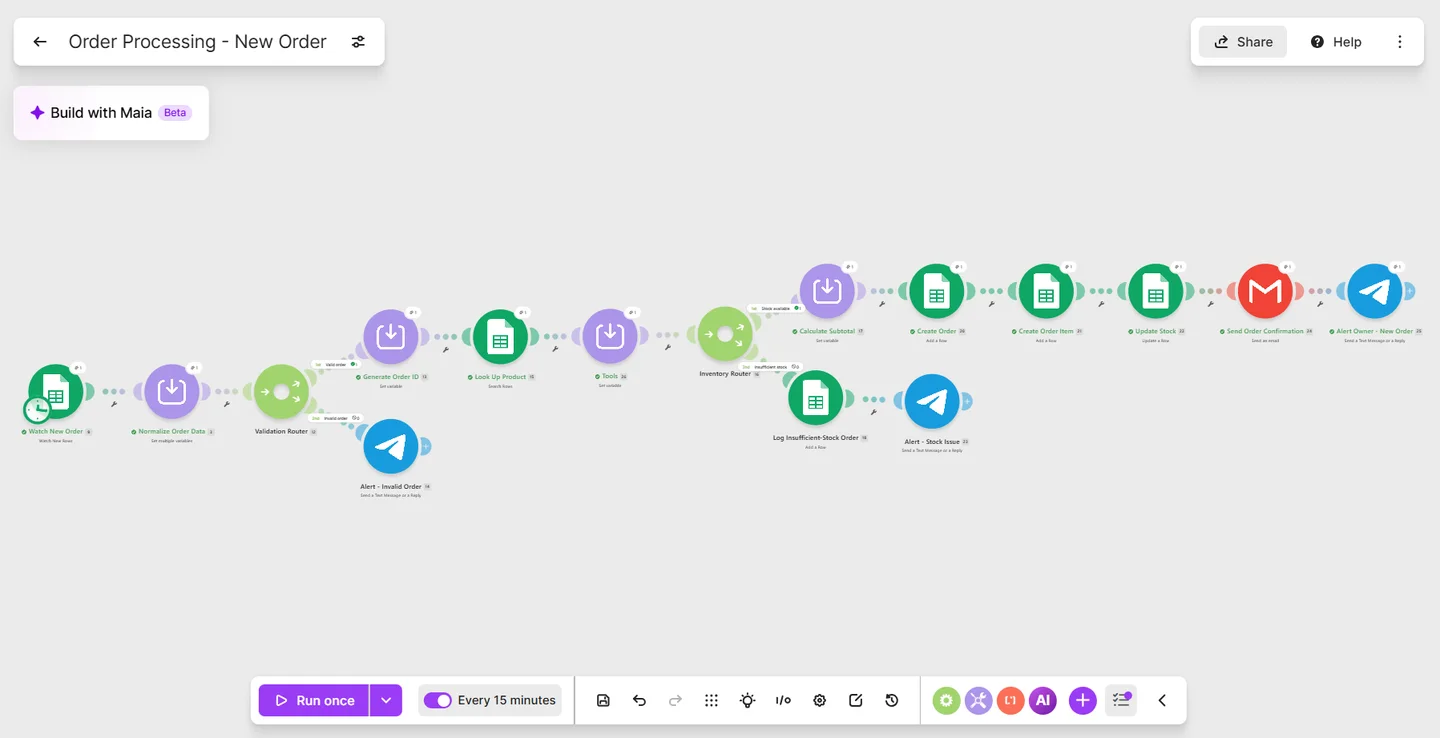
As soon as an order is submitted, the first gate cleans and checks the details. If a submission is missing an email address or asks for an invalid quantity, the pipeline stops it right there and sends a Telegram alert to the team instead of letting bad data into the order book.
Valid orders get a unique order number and check the live product sheet for current pricing and stock. An inventory router then splits the flow:
- When stock is available: The system calculates the order total, records the order and line items, subtracts the purchased quantity from available stock, emails a formatted confirmation receipt to the customer, and pings the owner on Telegram.
- When stock is short: The system logs the request to a backorder tab and alerts the owner immediately so they can contact the buyer before payment or packing begins.
The result
Routine orders now go from form submission to customer confirmation without anyone copying a single cell across spreadsheets. Stock counts stay accurate as orders arrive, out-of-stock requests are caught at the door, and staff only step in when an order genuinely needs human attention.
Next step
Tell us the problem. We will find the clearest way through.
A discovery call is a short conversation about what is slowing you down and what a good outcome looks like.