Sorting support tickets and escalating urgent customers before a human opens the inbox.
When every support request waits in the same queue for a manual first read, urgent customer issues sit behind routine questions. We built an automated triage pipeline that classifies incoming tickets, drafts replies from approved company FAQs, and alerts the right team channel in Slack.
Project overview at a glance
- 01 / The problem
- Support staff were reading every incoming form submission by hand to figure out what it was about, how urgent it was, and which teammate needed to see it.
- 02 / What we built
- We connected the intake form to an automated workflow that tags category, tone, and urgency on arrival, drafts a reply from official FAQ docs, and routes the ticket in Slack.
- 03 / What changed
- Frustrated customers with urgent problems trigger an immediate escalation alert, routine questions arrive with a ready-to-send draft, and every ticket is logged in Airtable.
- Tags every new ticket by topic, customer tone, and urgency the moment it arrives.
- Drafts first replies strictly from approved company documentation so answers stay consistent.
- Routes billing, technical, and account tickets to separate Slack channels and escalates high-urgency issues immediately.
The problem
In many growing service businesses, every customer enquiry lands in one shared inbox or form sheet. A team member has to open each message, figure out whether it is a billing mistake, a technical bug, or a simple password question, check the company’s help docs, and copy the right person in Slack.
That manual sorting breaks down as volume grows. Routine questions eat up the morning, while an upset customer facing an urgent billing or access failure can sit unread at the bottom of the queue for hours.
What we did
We looked at what a senior support lead actually does during the first two minutes with a new ticket, then automated that exact preparation step while keeping a human in control of the final reply.
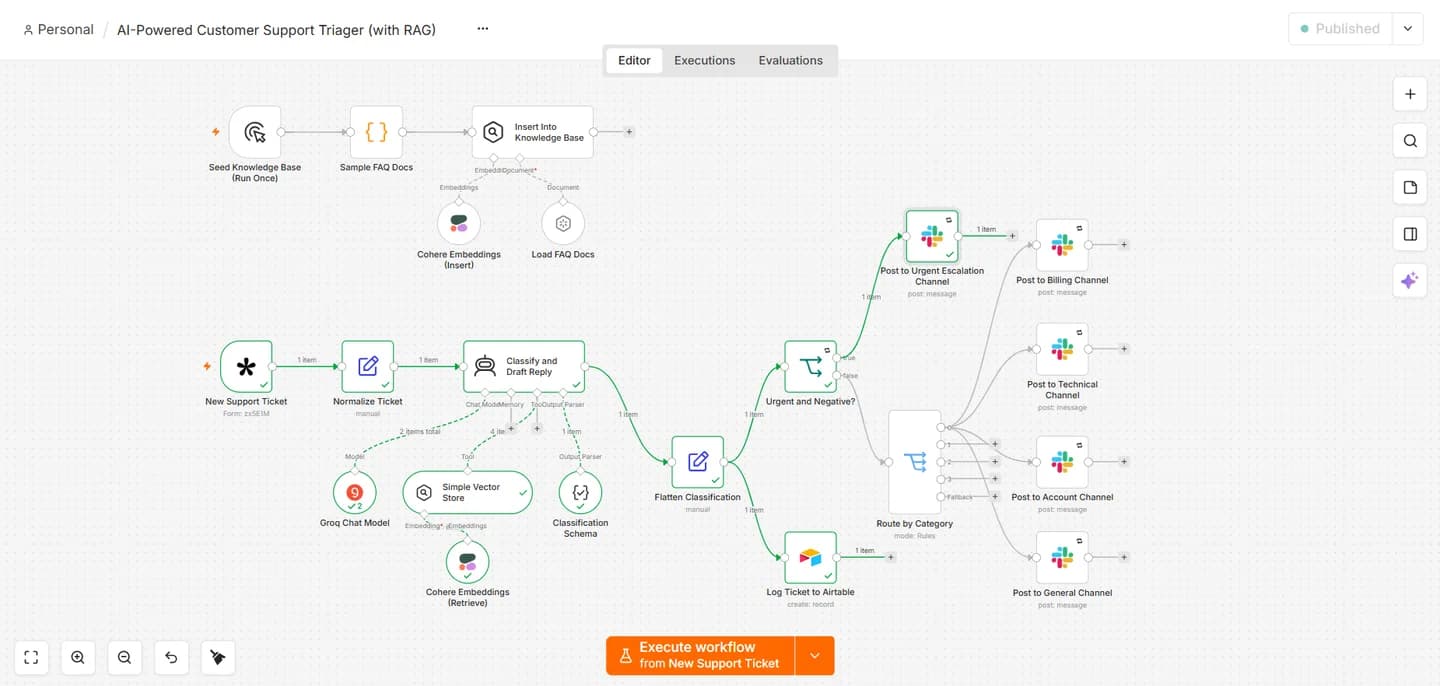
When a customer submits the support form, the workflow reads the message and assigns three clear labels: the department it belongs to (billing, technical, account, or general), the customer’s tone, and the urgency level. At the same time, the system searches the company’s approved FAQ documents and prepares a draft response based on those policies.
Next, a routing rule decides where the ticket goes. Standard tickets land in their matching Slack channel with the customer’s message, classification tags, and the suggested reply ready for a teammate to review. If a ticket comes in with both negative sentiment and high urgency, the workflow bypasses the normal queue and posts straight to an urgent escalation channel so the team can step in right away. Every ticket and draft is also recorded in Airtable for tracking.
The result
Instead of starting the day with an unsorted pile of messages, the support team opens Slack to find tickets already grouped by department, urgent issues flagged at the top, and a policy-backed draft waiting on each one. First response times drop, handoffs stay consistent regardless of who is on shift, and no upset customer gets lost behind routine admin.
Next step
Tell us the problem. We will find the clearest way through.
A discovery call is a short conversation about what is slowing you down and what a good outcome looks like.